> ## Documentation Index
> Fetch the complete documentation index at: https://docs.generalreferral.com/llms.txt
> Use this file to discover all available pages before exploring further.
# Requirements After Passing Your Exam
> What new licensees need to do after passing the real estate exam
General Referral is a great option for new agents looking for an introduction to the business and a low-cost alternative to hanging their license at a full-service broker.
**Time Sensitive:** After completing your pre-licensure coursework, New Jersey requires that you pass the state licensing exam and find a broker sponsor within one year of your class completion.
## Timeline Overview
Successfully complete the New Jersey real estate licensing exam
Complete our online application process
Upload the documentation listed below from your account
Arrange for required background check
State processes your application with General Referral as sponsor
## Required Documents
After signing up with General Referral, you'll upload your documents directly from your account — no emailing required:
After checkout you'll land on the signup success page. Create your account (or sign in) to upload your documents right there.
Not ready at checkout? Sign in later at [app.generalreferral.com/dashboard](https://app.generalreferral.com/dashboard) — while documents are still needed, the upload tool appears right on your dashboard, with a reminder banner whenever something still needs your attention.
 Upload a PDF, JPG, or PNG (max 10MB per file) for each required document. You can also attach any additional documents you'd like to share.
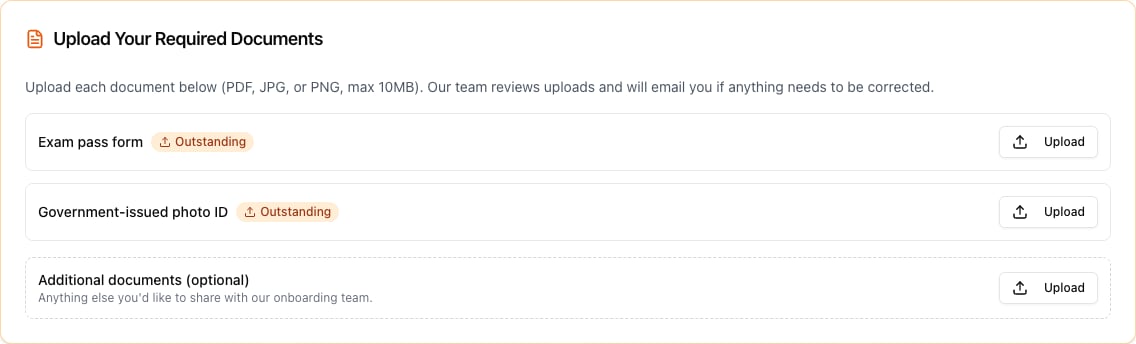 Our team reviews each document and emails you the outcome. If something can't be accepted (for example, a blurry photo), you'll get the reason and can upload a corrected copy from the same place.
### Government-Issued Photo ID
* State driver's license, OR
* Federal government ID, OR
* Valid passport
Must be current and clearly show your photo and information
### Copy of Exam Pass Notice
* Official notification from testing center
* Shows your name and pass status
* Includes exam date and score (if provided)
* Must be legible copy or scan
### Tracking Your Document Status
The upload tool shows each required document as **Outstanding**, **Pending review**, **Approved**, or **Rejected** (with the reason), so you always know what's left to do. Your dashboard also shows a reminder banner whenever a document still needs your action — it disappears on its own once you've uploaded. When both required documents are approved, you'll receive a confirmation email and no further document action is needed.
If you run into trouble uploading, you can still email your documents to [support@generalreferral.com](mailto:support@generalreferral.com) and we'll take care of them.
## Fingerprinting Requirements
**Critical Step:** You must complete fingerprinting as part of the licensing process. General Referral does not need confirmation of your fingerprint status - this is handled directly with the state.
### Fingerprinting Process:
1. **Schedule Appointment**: Use the [state's fingerprint portal](https://www.state.nj.us/dobi/division_rec/licensing/fingerprint.html)
2. **Attend Appointment**: Bring required identification
3. **Pay Required Fees**: Typically \$50-75 for processing
4. **Results Processing**: State receives results automatically
## Important Deadlines
Complete pre-licensure education
Pass exam AND find broker sponsor (that's us!)
Complete fingerprinting and submit documents
NJ reviews application and approves license
## What General Referral Handles
We serve as your sponsoring broker, meeting the state requirement for new licensees to be affiliated with a licensed brokerage.
We assist with the state application process and ensure all paperwork is properly submitted.
We handle payment of required state fees on your behalf (collected from you during signup).
Once licensed, we provide platform access, referral tools, and ongoing member support.
## After License Approval
Once the state approves your application:
You'll receive automatic email confirmation from NJ REC
Check status on the state's licensee search portal
Gain full access to your General Referral member portal
Begin making referrals and earning commissions
## Frequently Asked Questions
After submitting all documents and completing fingerprinting, approval typically takes 2-4 weeks, depending on state processing times and background check results.
If there are issues with fingerprint quality, you'll need to be re-printed. The state will notify you directly of any problems.
No, you must wait for official license approval before engaging in any real estate activities, including referrals.
If you don't find a sponsor within one year of class completion, you may need to retake pre-licensure education. Contact the state for specific guidance.
## Need Help?
Questions about our process or requirements
State licensing questions:
* Phone: (609) 292-7272
* Email: [relic@dobi.nj.gov](mailto:relic@dobi.nj.gov)
## Ready to Get Started?
Complete your application and take the next step in your real estate career
Our team reviews each document and emails you the outcome. If something can't be accepted (for example, a blurry photo), you'll get the reason and can upload a corrected copy from the same place.
### Government-Issued Photo ID
* State driver's license, OR
* Federal government ID, OR
* Valid passport
Must be current and clearly show your photo and information
### Copy of Exam Pass Notice
* Official notification from testing center
* Shows your name and pass status
* Includes exam date and score (if provided)
* Must be legible copy or scan
### Tracking Your Document Status
The upload tool shows each required document as **Outstanding**, **Pending review**, **Approved**, or **Rejected** (with the reason), so you always know what's left to do. Your dashboard also shows a reminder banner whenever a document still needs your action — it disappears on its own once you've uploaded. When both required documents are approved, you'll receive a confirmation email and no further document action is needed.
If you run into trouble uploading, you can still email your documents to [support@generalreferral.com](mailto:support@generalreferral.com) and we'll take care of them.
## Fingerprinting Requirements
**Critical Step:** You must complete fingerprinting as part of the licensing process. General Referral does not need confirmation of your fingerprint status - this is handled directly with the state.
### Fingerprinting Process:
1. **Schedule Appointment**: Use the [state's fingerprint portal](https://www.state.nj.us/dobi/division_rec/licensing/fingerprint.html)
2. **Attend Appointment**: Bring required identification
3. **Pay Required Fees**: Typically \$50-75 for processing
4. **Results Processing**: State receives results automatically
## Important Deadlines
Complete pre-licensure education
Pass exam AND find broker sponsor (that's us!)
Complete fingerprinting and submit documents
NJ reviews application and approves license
## What General Referral Handles
We serve as your sponsoring broker, meeting the state requirement for new licensees to be affiliated with a licensed brokerage.
We assist with the state application process and ensure all paperwork is properly submitted.
We handle payment of required state fees on your behalf (collected from you during signup).
Once licensed, we provide platform access, referral tools, and ongoing member support.
## After License Approval
Once the state approves your application:
You'll receive automatic email confirmation from NJ REC
Check status on the state's licensee search portal
Gain full access to your General Referral member portal
Begin making referrals and earning commissions
## Frequently Asked Questions
After submitting all documents and completing fingerprinting, approval typically takes 2-4 weeks, depending on state processing times and background check results.
If there are issues with fingerprint quality, you'll need to be re-printed. The state will notify you directly of any problems.
No, you must wait for official license approval before engaging in any real estate activities, including referrals.
If you don't find a sponsor within one year of class completion, you may need to retake pre-licensure education. Contact the state for specific guidance.
## Need Help?
Questions about our process or requirements
State licensing questions:
* Phone: (609) 292-7272
* Email: [relic@dobi.nj.gov](mailto:relic@dobi.nj.gov)
## Ready to Get Started?
Complete your application and take the next step in your real estate career